Lunacy Audio have added another new device to their Nova instrument player. Superslicer is a sample mangling tool that lets you slice and rearrange samples in some fun and clever new ways. Before I get into the details, I noticed that I needed to update Nova to use Superslicer, I also had to update Nova to use Tides. I’m not sure how I feel about a “platform” like this if I need to update it every time a new device is added. I understand having to install or download the new devices, but I’d rather see that Nova was a consistent version while new things are added. Perhaps this is a temporary phase in the over all development of Nova.
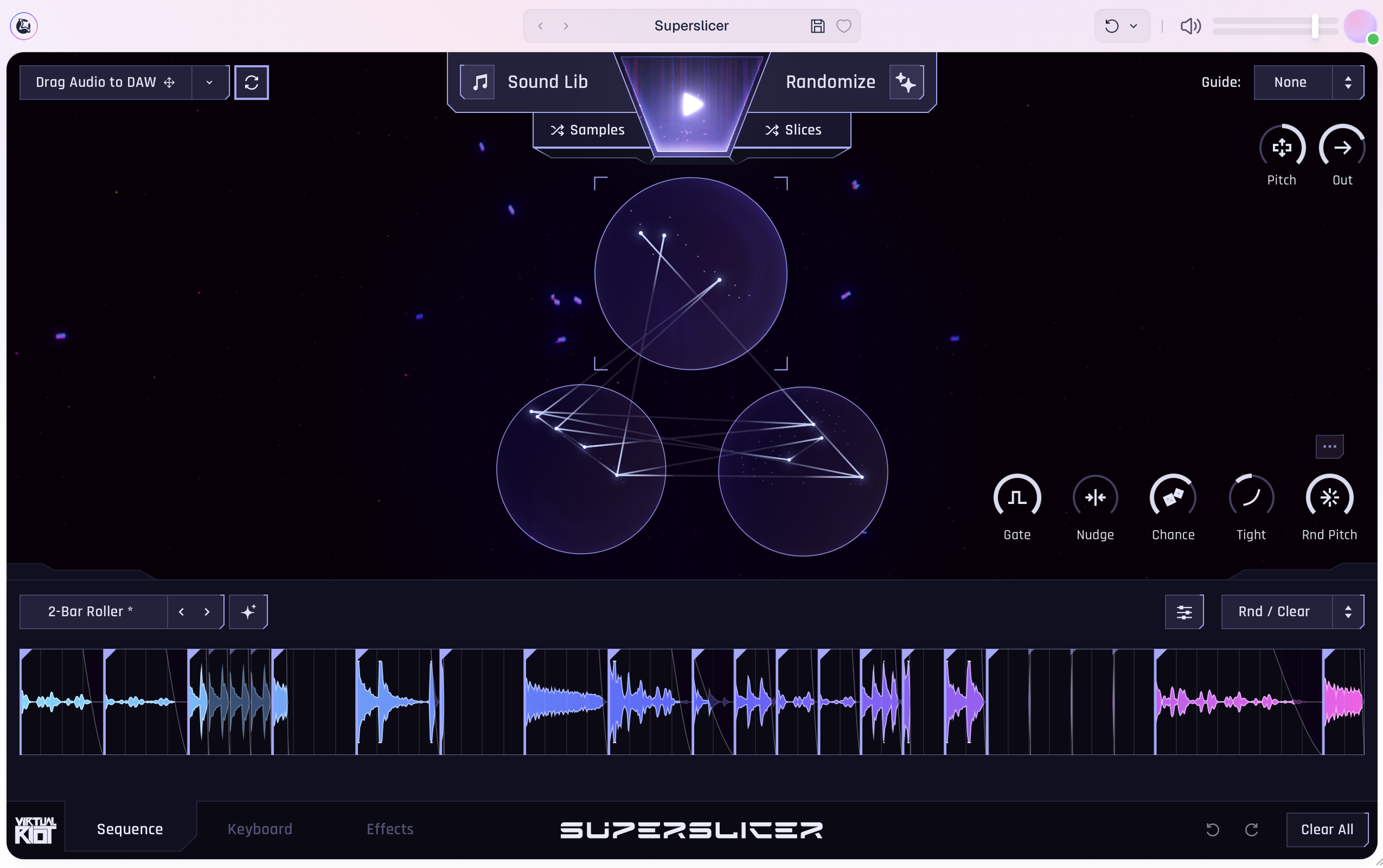
Back to Superslicer, the UI is quite unique. I could do without the particles floating around, but the slice constellation is pretty cool to look at. The colors are all very fun as well. The main draw here is the sample editor, which has some clever workflows. You can grab and rearrange any slice. This pushes other slices out of the way and has some fun results when moving slices of different sizes, as everything fills the space that was taken up by the moved slice.
You can also easily “slip” the slice window, a feature I always love to see that works wonders here. You can also grab slices from the sample “star map” and replace any slice. This all works very well for creating solid patterns and provides some fun experimentation.
However, I did run into some issues. I could not find an easy way to build out or squeeze samples into a pattern, you can only really rearrange or replace them. You can duplicate steps though, which works fine, but if you try to build out from an empty sequence, grabbing a slice from the star map opens up the keyboard window, thus hiding the sequence window.
Changing slice size is neat as it also adjusts the onset of its neighboring slice. There’s also some tools to loop a step internally up to 4 times or play with the gating of a step.
There are quite a few slice settings to adjust how samples are cut up, and many patterns to start out with as well. Superslicer has randomization buttons everywhere, some of which unfortunately sport the AI lens flair icon. The included samples are solid, but personally I want to work with my own samples and loops.
The effects section is simple, but has some neat tricks. The included effects are pretty basic, there is a grain effect and a volume MSEG called shaper. But I will say I enjoy the glitch effect a lot. It is dead simple, you adjust the probability that any of four different glitches take place: stutter, drop, reverse, and octave. You can load up to four effects and you can even stack four glitches if you want.
There’s also two busses with four effects slots each. The busses can be assigned per sequencer step, which allows you to mix or fix things up quite a bit.
Finally, you can drag your resulting pattern out into your DAW as a new audio file making this a really good scratch board for ideas. Play around, find something cool, drag it out, repeat. I think the workflow has a lot of potential, and I could see myself having some fun with this one in the right setting. However, as much as I like the creativity behind the UI, some of the handles and clickable regions were not as friendly as I’d like, and the workflow has some room for improvement. I’d really like to see some of these concepts brought into other sample slicing tools or even as DAW features. The way window slipping is just built in, and the way slices push each other out of the way is pretty incredible and fun.