
ABSYNTH 6 Review

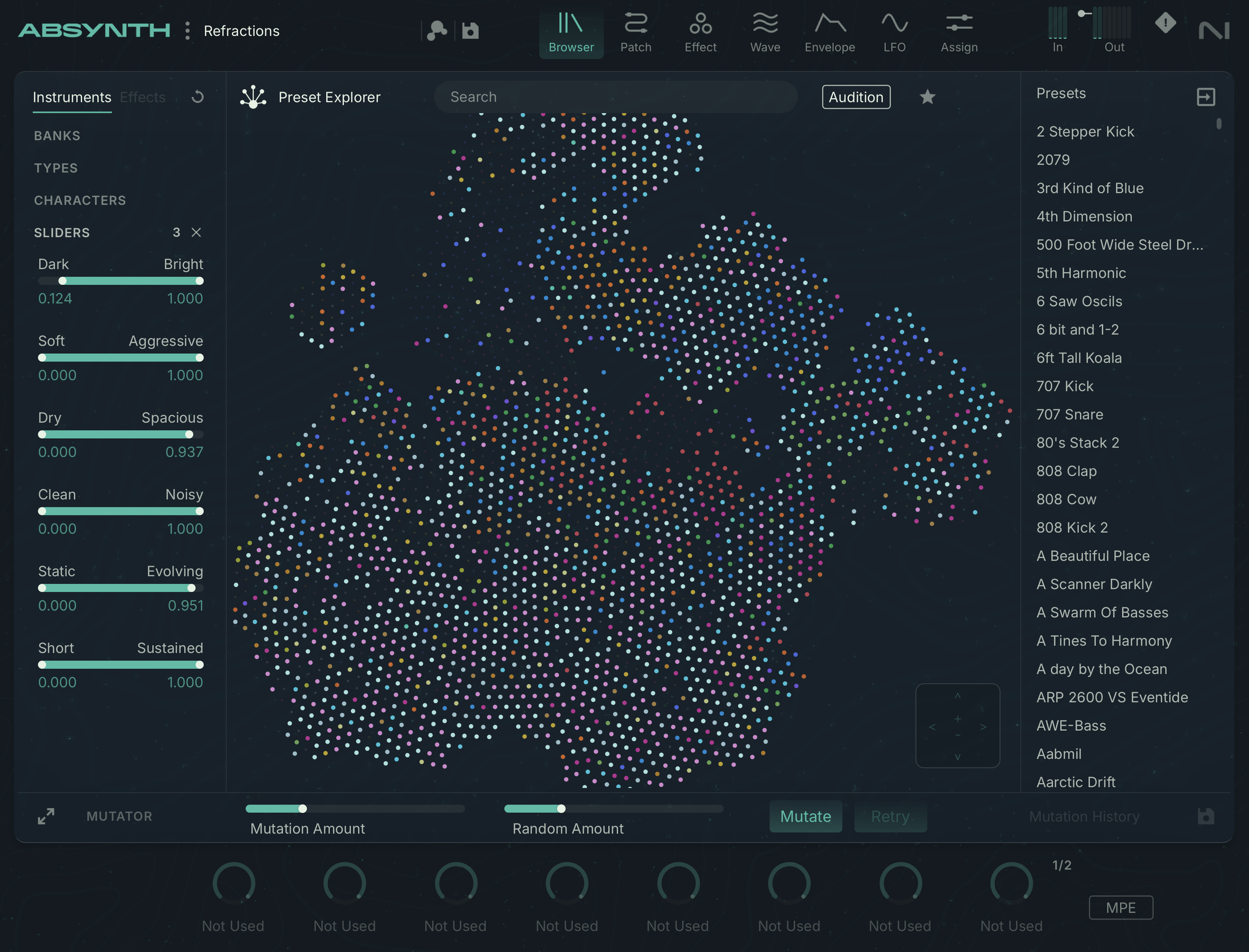
Native Instruments gave me an early copy of their latest update to the beloved Brian Clevinger synth Absynth. Awhile back I did a “farewell to Absynth” stream as they had discontinued this synth at that time. Now Native Instruments and Brian Clevinger have resurrected Absynth with it’s latest iteration, Absynth 6. This newest version of Absynth adds MPE, a visual Browser and scalable UI to fit comfortably on modern displays
First and foremost, Absynth 6 is 100% backwards compatible with previous Absynth presets and retains all features from the previous versions, nothing has been stripped or removed. For the most part, the UI layout is the same, but with a much nicer visual styling and easier navigation. The new UI is a bit darker and simpler, with more attention to shape and contrast, making everything much more readable. Circular knobs dials have replaced the tiny hexagons found in the previous version of Absynth and just over all, more attention has been paid to visual hierarchy.
A new browser has been added to Absynth 6, giving you a nodal field map of every preset with neighboring nodes being the most similar presets available. Clicking any preset demos a brief preview and double clicking loads the preset. Deactivating audition mode allows you to click once to change presets. The mutator is still available in the patch browser as well as the mutation history. A new character slider lets you adjust which presets are shown based on a few criteria, the map will hide all presets that are outside the range you select, which I found to be a much more engaging way to explore patches instead of selecting various categories.
Seeing as I haven’t reviewed Absynth previously, this will also serve as my review for Absynth as a whole. Absynth is a three oscillator hybrid synthesizer that offers a variety of oscillator types, oscillator effects, insert effects and a very dimensional send effect. Absynth allows you to morph and mutate presets and modulate controls with complex MSEGs.
OSCILLATORS
The primary “patch” page of Absynth contains three oscillators, each oscillator is followed by two inset effects that can be used as filters, distortions and more which I’ll cover further in the effects section of this review. Each oscillator can be set to one of 8 modes: single, double, fm, ringmod, fractalize, sync gran, sample, or granular. Other than the sample based engines, each mode can go up to eight voices of unison. In addition to these eight modes, there is also an audio input allowing you to use Absynth as an effect.
The oscillators sound very pleasant and clean and handle modulation quite well, for example you can easily make some solid kicks with a simple sine and pitch envelope. The oscillators also have the ability to morph between two shapes, which can be edited in the “wave” tab.
The wave editor is a bit tricky, by default there is nothing in this page, but when selecting any waveform you can click “new” to create a new copy of the wave and open it in the editor. From here you can edit and design your new wave forms. Note that you need to start from a morph waveform for the morph option to be available. The wave editor has a couple tools to draw directly on the waveform or edit its partials, it also includes a few transform operations like FM filters and harmonic shifting. If you find yourself feeling like you’ve mastered Absynth, definitely check out this side of things as it opens up many possibilities.
FM/RM
Classic FM synthesis, you get two operators, sounds very smooth and clean, the second operator can be put into “ratio” mode which is always nice. RM mode of course uses ring mod instead of phase modulation, but all settings are retained between modes.
Fractalize
Fractalize takes your waveform and superimposes copies of its self along the waveform’s contour. You can iterate this up to seven times for very complex harmonic structures that are self similar as you zoom in. This is a very textural and fun oscillator type.
Sync Gran
A gritty “hard sync” style oscillator, but with some cool twists, you can increase the synced oscillator’s density, for an almost unison style sync tone, as well as add diffusion to the synced oscillators giving them a noisy airy texture.
Granular
A nice granular oscillator with controls for time, frequency, and amplitude jitter, grain size, and a density up to 32 grains. Reducing the Time control allows you to freeze the playhead in place and scrub through the sample with the “start” control
EFFECTS
The effects are really the highlight of Absynth, each oscillator gets two slots where one of several effects can be loaded. All three oscs are then summed into two more effects then finally the master effect. The insert effects include filters, a wave shaper, “super comb” and a grain cloud, as well as frequency shifting and ring mod. Many of the effects include a “feedback” section that allows you to insert an additional wave shaper, frequency shifter or ring mod into that effect’s feedback loop
Some of the effects are fairly deep, grain cloud and super comb offer a wide range of controls to shape motion and texture. The wave shaper also includes a large variety of shapes, but also the ability to create your own shapes with the “wave” tab and even morph between wavetable frames.
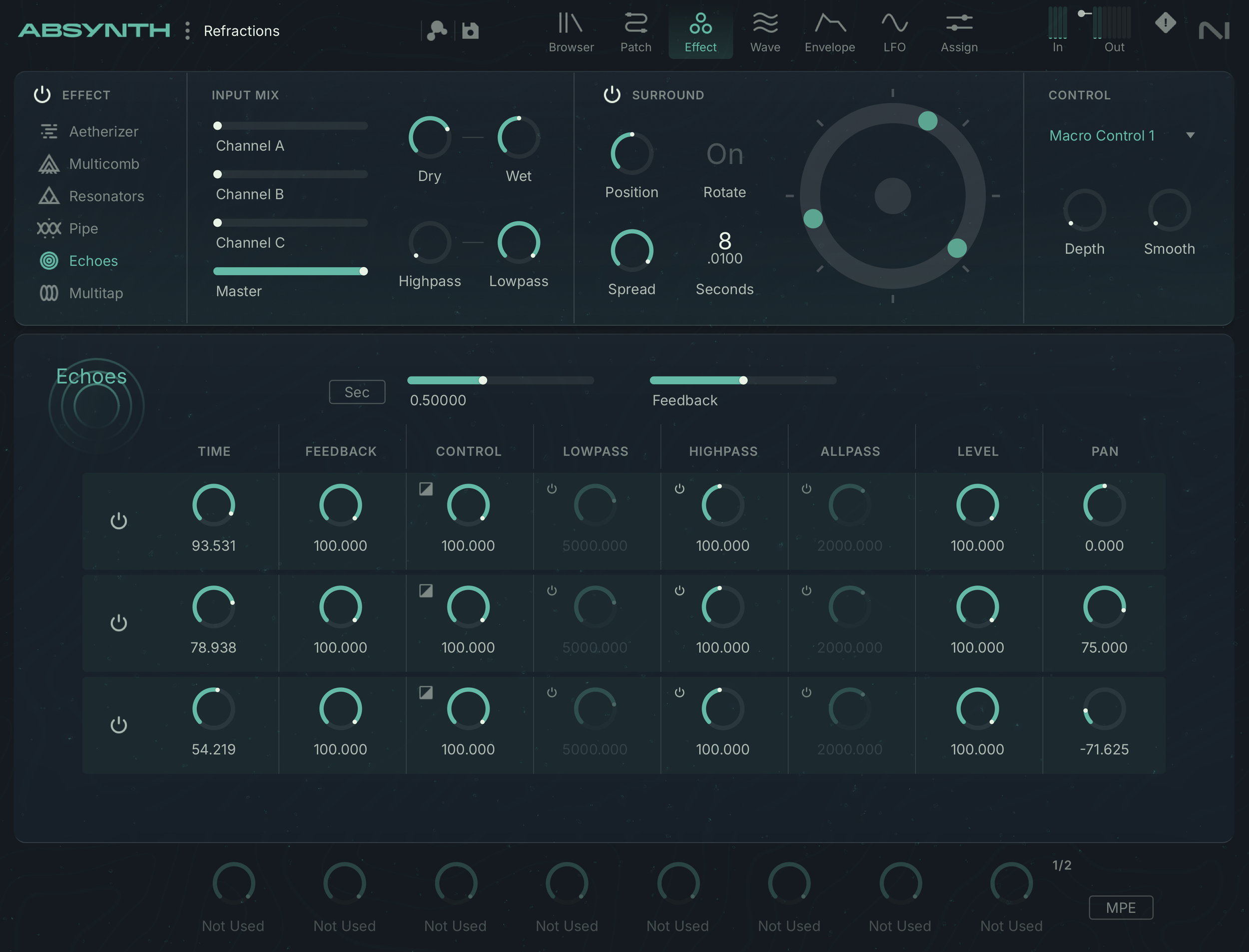
The effect tab hosts Absynth’s master effect which can be set to one of six modes: Aetherizer, Multicomb, Resonators, Pipe, Echoes, and Mutlitap. In addition to these modes is a surround sound mixer that can rotate your patch for enhanced spatial motion. The six effects types each have their own set of expansive controls, and could really be entire plugins all their own.
Aetherize
A nice dense granular delay cloud, what makes this one unique is per grain filtering which can be set to bandpass or comb mode. I found bandpass mode with high resonance to create incredibly cool liquid metallic sounds.
Multicomb
Up to six parallel comb filter resonators that stack for some rich harmonic resonance. Great for flanging, but I think you could also get some cool color bass tones out of this.
Resonators
Three parallel resonant bodies with controls for size, shape and color
Pipe
A single resonant body styled after pipe with controls for input position and output positions. As though you are playing audio from a loud speaker into a pipe with two microphones to record the resulting acoustics.
MODULATION
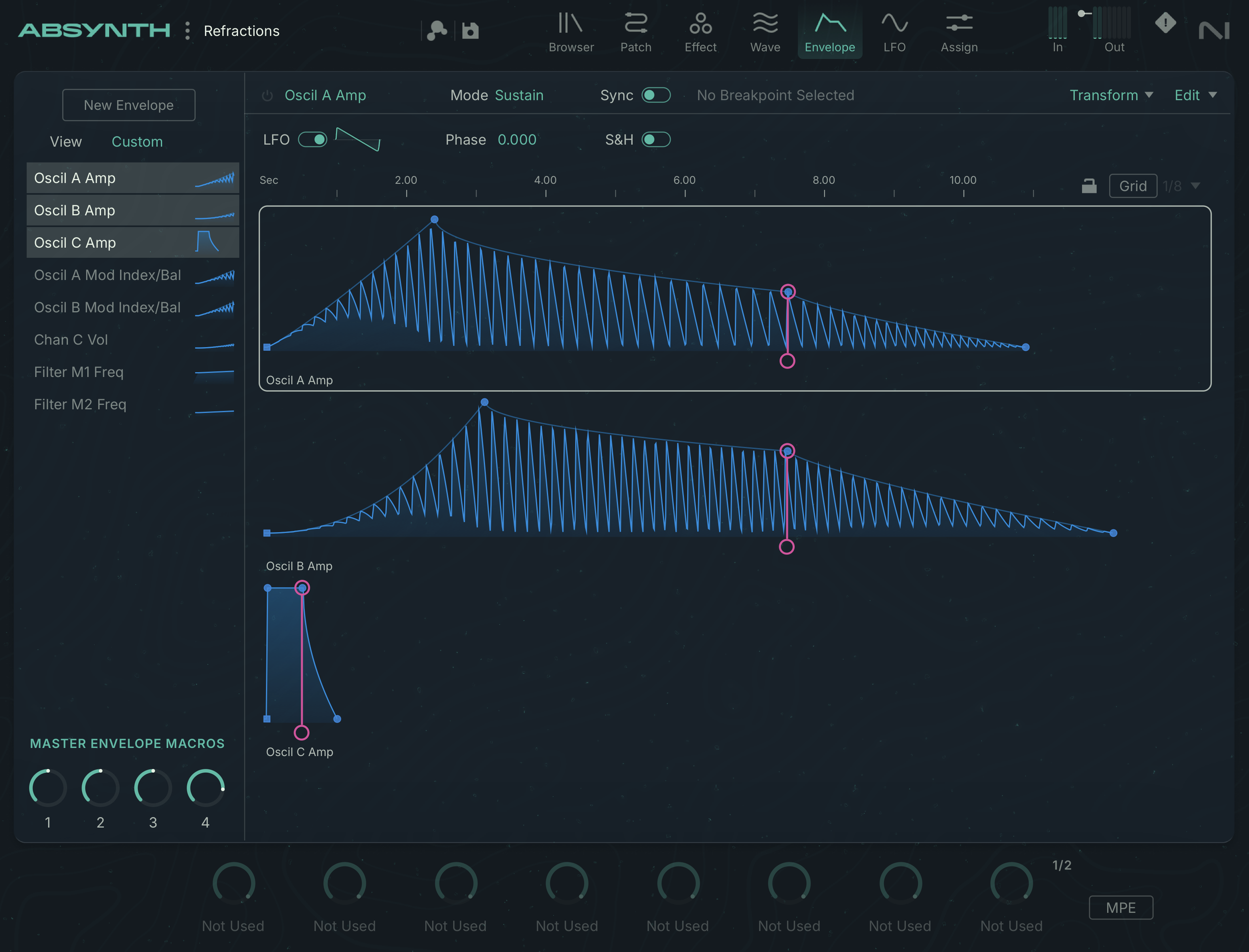
Absynth has three LFOs that can be mapped to various oscillator and effects controls. The LFOs can use any of the waveforms in Absynth, including custom waveforms and the morph waves, this means you can also morph the LFO waveforms if you want. The majority of your modulation however will be done with the robust MSEGs. You can right click most controls and select the “create new envelope” option to create an envelope for the control. Unfortunately it looks like each envelope is only mapped to a single control, so you may end up doing quite a bit of copying and pasting if you want several controls to share the same motion.
This MSEG style isn’t my favorite, as I prefer the looping fixed LFO style MSEGs, but it does allow you to create long complex shapes that evolve over time. There is tempo locking and looping as well as a grid option, but I find these all to be a bit more finicky for rhythmic design. Again, this style is better for long complex morphing. There’s also a cool “LFO” feature built into the envelopes, that super imposes an LFO onto your curve, and just like the LFOs on the LFO page, you can pick from any of the oscillator shapes in Absynth (though without the warping).
The wide variety of unique effects, modulation and oscillator types are what really make Absynth such a cool synth. There’s a lot of great sounds that are available, and it’s all done just differently enough to push you into a different creative zone. It’s one of the weirder UIs, like Zebra or Wave Razor, and not quite as intuitive as synths like Serum or Phase Plant. This isn’t a deal breaker by any means, but something to keep in mind. Though, I suspect for some they will appreciate this different approach to sound design. I’m not sure if it is the color scheme, but I find myself leaning into some of the more fluid and ethereal sounds that Absynth is capable of while using it. There’s a lot to explore with this one and I’m excited to see it used with MPE and other modern expressive control.
If you plan on purchasing ABSYNTH 6 from Plugin Boutique, please consider supporting me by using my affiliate links
ABSYNTH 6: https://www.pluginboutique.com/product/1-Instruments/4-Synth/15917-Absynth-6?a_aid=61c378ab215d5
ABSYNTH 6 update: https://www.pluginboutique.com/product/1-Instruments/4-Synth/15920-Absynth-6-Update?a_aid=61c378ab215d5